FAB Balance Check Online – PPC Salary & Ratibi Card Enquiry
Checking your FAB balance is simple if you use the right channel for your card or account type. First Abu Dhabi Bank customers can check their balance through the FAB Mobile app, online banking, ATM, customer care, Payit wallet, or the prepaid card inquiry portal.
If you receive your salary through a FAB prepaid salary card, Ratibi card, or PPC card, the fastest method is usually the prepaid card inquiry portal powered by Magnati. If you have a regular savings, current, or salary account, the FAB Mobile app or online banking gives you more complete access to your balance, statements, transfers, and recent transactions.
This guide explains each FAB balance check method clearly, including online salary card inquiry, Ratibi balance checking, ATM inquiry, mobile banking, common errors, and safety tips.
Quick FAB Balance Check Methods
| Method | Best For | Internet Required | Speed |
|---|---|---|---|
| PPC Magnati Inquiry Portal | FAB prepaid salary cards and Ratibi cards | Yes | Fast |
| FAB Mobile App | Bank accounts, cards, statements and daily banking | Yes | Fast |
| FAB Online Banking | Desktop users and full account access | Yes | Fast |
| Payit Wallet | Ratibi card and digital wallet users | Yes | Fast |
| FAB ATM | Offline balance checking | No | Instant |
| Customer Care | Users who need help or verification | No | Moderate |
| SMS Banking | Registered SMS banking users | No | Fast |
What Is FAB Balance Check?
FAB balance check means viewing the available money in your FAB account, salary card, prepaid card, or linked wallet. It helps you confirm whether your salary has arrived, whether a transaction has been deducted, or whether your card has enough funds for withdrawal or payment.
The right method depends on what you are using. Salary card users usually need the prepaid card inquiry portal, while full bank account users should use FAB Mobile or online banking.
FAB Balance Check Using PPC Magnati Prepaid Cards Enquiry
The PPC Magnati inquiry portal is one of the most useful options for FAB salary card, Ratibi card, and prepaid card users. It does not require full online banking login, which makes it convenient for employees who only want to check their salary card balance.
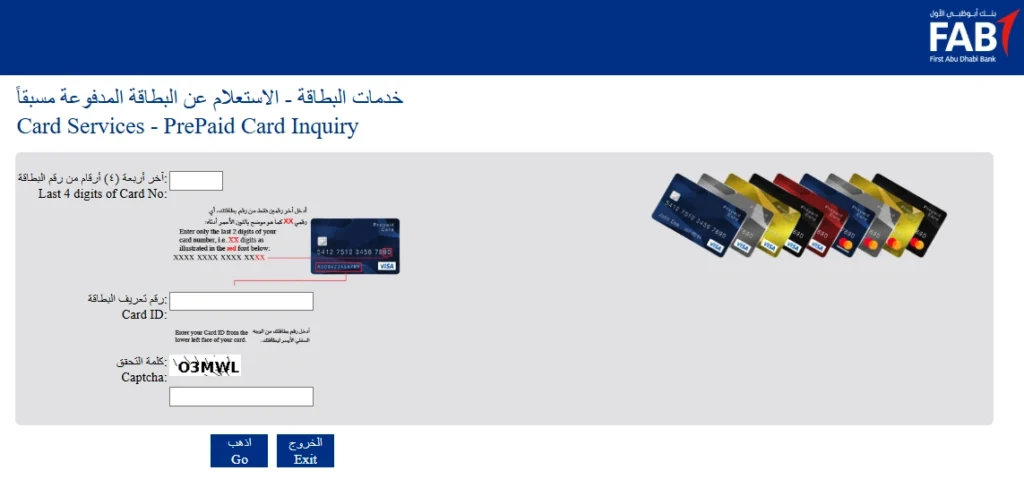
The official prepaid card inquiry page asks for the last 4 digits of the card number, Card ID, and captcha verification.
Steps to Check FAB Salary Card Balance Online
- Open the official PPC Magnati prepaid card enquiry page.
- Enter the last 4 digits of your card number.
- Enter your Card ID.
- Complete the captcha shown on the page.
- Click “Go”.
Your available balance or card information should appear on the screen if the details are correct.
Where to Find the Card ID
The Card ID is usually printed on the card or shared with the card details when the card is issued. It is different from your PIN. Do not share your PIN, OTP, password, or full card number with anyone.
Who Should Use This Method?
Use the PPC inquiry portal if you have:
- FAB prepaid salary card
- Ratibi card
- PPC salary card
- Payroll card
- Company-issued prepaid card
This method is useful for workers who receive salaries through WPS payroll systems and do not have a full FAB current or savings account.
FAB Balance Check Through FAB Mobile App
The FAB Mobile app is better for customers who have a full FAB account or card access. FAB describes its mobile banking app as a way to manage accounts, debit cards, credit cards, payments, and balances from your phone.
Steps to Check Balance in FAB Mobile App
- Download the FAB Mobile app from Google Play or the Apple App Store.
- Log in using your registered credentials.
- Complete OTP or biometric verification if required.
- Open the account or card dashboard.
- View your available balance and recent transactions.
The FAB Mobile app is useful because it shows more than just balance. You can also view statements, manage cards, make transfers, pay bills, and monitor account activity.
Best For
- Savings account users
- Current account users
- Salary account users
- Debit card users
- Credit card users
- Customers who need statements
- Users who want full banking access
The FAB Mobile app is not always the best option for every prepaid payroll card holder. If your card is only a salary or Ratibi prepaid card, the PPC inquiry portal or Payit may be easier.
You may also read How to Get a Salary Certificate in the UAE.
FAB Balance Check Through Online Banking
FAB online banking is useful if you prefer checking your account from a desktop or laptop. It gives access to account balances, card details, statements, transfers, and other banking services.
Steps to Check FAB Balance Online
- Go to the official FAB website.
- Choose Personal Online Banking.
- Log in with your username and password.
- Complete OTP verification if asked.
- Open the accounts or cards section.
- Check your available balance, ledger balance, and recent activity.
Online banking is a good option for people who manage multiple accounts or need to download statements for salary proof, visa work, accounting, or personal records.
Read How to Calculate Leave Salary in UAE.
FAB Ratibi Card Balance Check Through Payit
Ratibi card users can also use Payit to manage salary-related funds digitally. Payit has a dedicated Ratibi card page that mentions linking a Ratibi card to the Payit app and checking the Ratibi card balance through the app.
Steps to Check Ratibi Balance in Payit
- Install the Payit app.
- Register with your UAE mobile number.
- Complete the required verification.
- Link your Ratibi card if eligible.
- Open the wallet or card balance section.
- View your available balance and activity.
You can check how to Transfer Money from Ratibi Card.
Payit is helpful for Ratibi users who want more than a basic balance check. Depending on eligibility and account setup, users may also access wallet payments, transfers, and digital salary account features.
FAB ATM Balance Inquiry
ATM balance inquiry is still one of the easiest offline methods. It works well when you do not have internet access or prefer checking your balance in person.
Steps to Check FAB Balance at an ATM
- Visit a FAB ATM or supported ATM.
- Insert your FAB card or salary card.
- Enter your PIN.
- Select “Balance Inquiry”.
- View your balance on screen.
- Print a receipt if needed.
ATM balance checking is useful for salary card users, debit card users, and customers who want a printed balance record.
FAB Customer Care Balance Inquiry
If you cannot access the app, portal, ATM, or online banking, customer care can help after identity verification. FAB lists 600 52 5500 for UAE customers and +971 2 681 1511 for international callers.
When to Contact FAB Support
Contact FAB if:
- Your salary card balance is not showing
- The PPC portal is not loading
- Your Card ID is not accepted
- Your mobile app login is blocked
- You did not receive an OTP
- Your card is expired, blocked, or damaged
- Your salary deposit is delayed
Customer care may ask for verification details before sharing account or card information. Never share your OTP, full password, or PIN with anyone claiming to be from the bank.
Can You Check FAB Balance by SMS?
Some FAB customers may have access to SMS banking if it is activated on their registered mobile number. SMS banking is useful when there is no internet connection, but the correct command can depend on your account type and registration status.
For safety, confirm the latest SMS banking format through FAB customer care, your branch, or the official banking guide before publishing or using a code. This avoids failed requests and prevents outdated instructions.
Available Balance vs Ledger Balance
Many users get confused when the available balance and ledger balance are different.
Available Balance
Available balance is the amount you can use right now for withdrawals, payments, or transfers.
Ledger Balance
Ledger balance may include pending transactions, holds, or amounts that have not fully cleared.
For example, if a hotel, fuel station, online merchant, or payment gateway places a temporary hold on your card, your available balance may reduce before the final transaction is completed.
Common FAB Balance Check Problems and Fixes
PPC Inquiry Portal Not Working
This can happen because of browser issues, wrong card details, expired sessions, captcha errors, or temporary maintenance.
Try these fixes:
- Check the last 4 digits again
- Re-enter the Card ID carefully
- Refresh the captcha
- Use another browser
- Clear browser cache
- Try again later
Contact FAB if the issue continues.
Card ID Not Accepted
If your Card ID is rejected, make sure you are not entering your PIN, account number, or full card number by mistake. The Card ID is a separate identifier used for prepaid card inquiry.
OTP Not Received
OTP issues can occur due to network delays, weak signal, a changed mobile number, or blocked SMS services.
Try these fixes:
- Wait for a few minutes
- Request the OTP again
- Check your registered mobile number
- Restart your phone
Contact FAB if your number has changed.
FAB Mobile App Not Opening
If the app crashes or does not load:
- Update the app
- Restart your phone
- Clear app cache if available
- Reinstall the app
- Check your internet connection
- Try again after some time
ATM Card Not Reading
If the ATM cannot read your card:
- Clean the chip gently
- Try another ATM
- Check if the card is damaged
- Make sure the card is not expired
Contact FAB for replacement if needed.
Security Tips for FAB Balance Inquiry
Checking your bank balance is simple, but you still need to protect your details.
Follow these safety tips:
- Use only official FAB or Magnati channels
- Do not share OTPs
- Do not share your PIN
- Do not give your full card number to unknown websites
- Avoid public WiFi for banking
- Log out after using online banking
- Do not save passwords on shared devices
- Check the website address before entering details
- Call FAB directly if you suspect fraud
If someone calls and asks for OTP, PIN, password, or full card details, treat it as a scam. To secure your account balance, you can immediately deactivate your FAB Debit Card.
Best FAB Balance Check Method for Each User
For Salary Card Users
Use the PPC Magnati prepaid card inquiry portal. It is quick and designed for prepaid card balance checks.
For Ratibi Card Users
Use the PPC inquiry portal or Payit if your Ratibi card is linked and supported.
For Full FAB Account Users
Use FAB Mobile or online banking. These options give full access to account balances, statements, transactions, and transfers.
For Users Without Internet
Use an ATM or contact FAB customer care.
For Statement Downloads
Use FAB Mobile or online banking. These are better for downloading full transaction history or account statements.
FAQs
How can I check my FAB salary card balance online?
You can check your FAB salary card balance through the PPC Magnati prepaid card inquiry portal. Enter the last 4 digits of your card number, Card ID, and captcha, then click “Go” to view your card information.
Can I check FAB balance without online banking?
Yes. Prepaid salary card and Ratibi users can use the PPC Magnati inquiry portal without full online banking login. You can also check your balance through an ATM or customer care. But first you must activate the FAB Ratibi Card.
What details are needed for FAB prepaid card inquiry?
You usually need the last 4 digits of your card number, your Card ID, and the captcha shown on the inquiry page.
Is the FAB Mobile app useful for salary card users?
The FAB Mobile app is useful for full FAB banking customers. Some prepaid salary card users may find the PPC inquiry portal or Payit easier, depending on the card type and access available.
Can I check Ratibi card balance through Payit?
Yes, eligible Ratibi card users can link their card to Payit and check their balance through the Payit app.
Why is my FAB balance different from my ledger balance?
Your available balance shows what you can use immediately. Ledger balance may include pending transactions, temporary holds, or payments that have not fully cleared.
What should I do if the PPC portal does not show my balance?
Check your card details, refresh the captcha, try another browser, and clear your cache. If the issue continues, contact FAB customer care for support.
Is FAB balance check free?
Balance inquiry through official digital channels is generally free, but SMS or telecom charges may apply depending on your mobile provider and service type.
What is the FAB customer care number?
FAB lists 600 52 5500 for UAE customers and +971 2 681 1511 for international customers.
Final Thoughts
The best FAB balance check method depends on your account or card type. If you use a FAB prepaid salary card, PPC card, or Ratibi card, the PPC Magnati inquiry portal is usually the quickest option. If you have a regular FAB account, the FAB Mobile app or online banking gives you better control over your balance, statements, transfers, and card activity.
For most users, the safest approach is to use official FAB, Magnati, Payit, ATM, or customer care channels. Avoid unofficial forms that ask for sensitive information, and never share your OTP, PIN, password, or full card number with anyone.