How to Check UAE Visa Status Online?
Need to know if a UAE visa is still valid? The answer takes one minute.

Go to the ICP website. Or GDRFA for Dubai visas. Type in the passport number. Add nationality. Add birth date. Hit search. The status shows up right away. Free. No registration. No branch visit.
For phone users, the UAEICP app works even faster. Download it. Tap Public Inquiry. Enter passport details. Done.
This guide walks through every official way to check UAE Visa Status. No scams. No fake sites. Just real steps that work.
Documents and Details Required
Get these things first. Saves time. Prevents errors.
What you need:
- Passport. The real one. Read the numbers carefully.
- Nationality. Exactly what the passport says.
- Birth date. Double-check day and month order.
- Visa number. Nice to have. Not required.
Visas you can check:
Employment. Visit. Tourist. Residence. Transit. Student. Family visa. All work.
One big thing to know:
Dubai visas need GDRFA. Not ICP. Everyone else uses ICP. New visas take one to two days to show up. Checking ten minutes after applying shows nothing. Be patient.
Method 1: ICP Website (Not for Dubai)
ICP covers Abu Dhabi, Sharjah, Ajman, Umm Al Quwain, Ras Al Khaimah, and Fujairah. Anyone outside Dubai uses this.
Here is how:
Open a browser. Go to the real ICP website. Not a copycat. Look for “Visa Status” or “Public Inquiry.” Click it.
Pick “Passport Information” from the menu. Type the passport number exactly. Letters and numbers both matter. Pick a nationality from the list. Enter birth date.
Solve the captcha. Those annoying letters. Type them carefully. Click search.
What the screen tells you:
Five possible answers.
- Valid: Good to go. Visa works.
- Expired: Too late. Overstay fines start now.
- Cancelled: Sponsor pulled the visa. Need a new one.
- Under Process: Still waiting. Check tomorrow.
- Rejected: Denied. Ask the sponsor why.
The expiry date shows up clearly. Write it down. Set a phone reminder one month before.
Nothing shows up?
Wait another day. Double-check every letter and number. Try the visa application number instead. If still nothing, the visa might be from Dubai. Switch to GDRFA.
Method 2: GDRFA Website (Dubai Only)
Dubai does its own thing. Separate website. Separate system. ICP will not find Dubai visas.
When to use GDRFA:
- The visa says Dubai on it.
- ICP gave “No Record Found.”
- Your sponsor is in Dubai.
Here is how:
Go to the GDRFA website. Click “Visa Inquiry.” Choose “Passport Information” or “File Number.”
Enter passport details. Or enter the file number from your visa stamp. Solve the captcha. Click submit.
What comes back:
Visa status. Remaining days for visit visas. Expiry date for residence visas. Sponsor name.
Method 3: UAEICP Mobile App (Fastest)
The app is better than any website. No login needed. Just open and search.
Getting the app:
iPhone: App Store. Android: Play Store. Search “UAEICP.” Look for the blue logo. Check who made it. Fake apps exist. Download the wrong one and risk your data.
Checking a visa:
Open the app. Tap “Public Inquiry.” Tap “Visa Status.” Choose “Passport.” Enter passport number, nationality, and birth date. Tap search.
Status appears in seconds. No account. No password. No fees.
Why everyone uses the app:
Saves passport details for next time. Sends alerts when visa status changes. Also checks the Emirates ID and health insurance. Three things in one app.
Method 4: Amer Website (Dubai Tourists)
Amer handles tourist visas for Dubai. Their website works well for visitors.
Who should use Amer:
- Tourists in Dubai.
- People who applied through Amer centers.
- Anyone needing the remaining days on a tourist visa.
Here is how:
Go to the Amer website. Click “Visa Inquiry.” Search by passport number or application number.
Enter passport details. Or enter the 10-digit number from your receipt. Click search.
What shows up:
Approval status. Validity dates. Number of entries allowed. Remaining days.
Method 5: Typing Centers (No Internet)
Not everyone has internet. Not everyone wants to deal with websites. Typing centers solve that.
When to go:
- No internet at home.
- Websites feel confusing.
- Need a printed copy for work or government.
What to bring:
Passport. Visa copy if you have it. Cash. Ten to thirty dirhams.
Visas you can check:
Employment. Visit. Tourist. Residence. Transit. Student. Family visa. All work. If you’re unsure which category your visa falls under, reviewing different UAE visa types can help you identify it correctly before checking the status.
What happens:
The employee logs into ICP or GDRFA. Types in passport details. Prints a status report. Takes five minutes. The printed copy works for employers and official use.
What Those Status Messages Actually Mean
“Valid”: Visa works. Stay or travel until expiry date.
“Expired”: Visa done. Overstay fines start now. Leave or renew immediately.
“Cancelled”: Sponsor ended the visa. Need a new one. Sometimes, you get 30 days’ grace.
“Under Process”: Waiting for approval. Check again tomorrow.
“Rejected”: Application denied. Ask the sponsor or the typing center why. Fix it. Apply again.
Fixing Problems That Pop Up
“No Record Found” keeps showing.
Wrong info, probably. Re-enter slowly. Wait 48 hours if the visa is new. Dubai visas need GDRFA. Try that.
The website won’t load.
Government sites get busy. Try early morning. 6 AM to 8 AM works best. Clear browser cache. Switch to Chrome or Firefox.
Captcha keeps failing.
Type exactly what you see. Upper and lower case matter. Click refresh for a new one. Try again.
The passport number has letters.
Type them. Do not skip. Example A1234567 has an A. Include it.
Stay Safe. Seriously.
Use only official websites. ICP. GDRFA. Amer. That is it. Never type passport details into random sites. Scammers build fake ones to steal data.
Do not pay for online status checks. Government portals are free. Typing centers charge a small printing free. That is the only cost.
Log out on public computers. Clear browser history. Do not save passport info on shared machines.
Frequently Asked Questions
Q1: How soon does a visa status show up online?
Tourist visas: 24 hours. Work visas: 3 to 5 working days.
Q2: Can I check with just the passport number?
Yes. Passport number, nationality, and birth date. That is all.
Q3: ICP or GDRFA? Which one?
ICP for Abu Dhabi, Sharjah, Ajman, UAQ, RAK, Fujairah. GDRFA for Dubai only.
Q4: Is there a fee?
No. Government sites are free. Typing centers charge 10 to 30 AED for printing.
Q5: What does “No Record Found” actually mean?
Either the visa is too new, or it is a Dubai visa being searched on ICP.
Q6: How does the mobile app work?
Download the UAEICP app. Tap Public Inquiry. Enter passport details. Status appears instantly.
Final Words
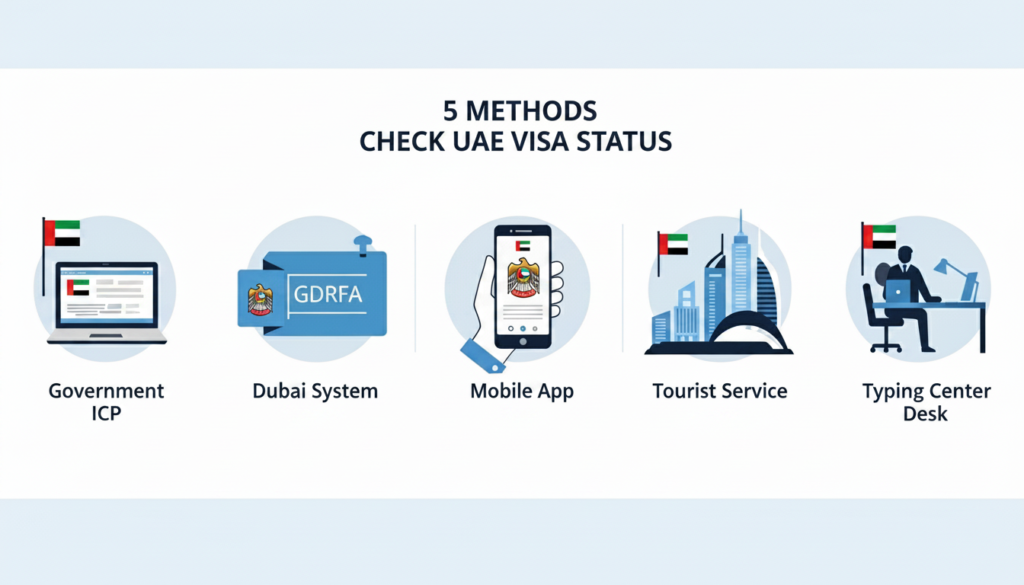
Checking a UAE visa status takes two minutes. Five ways to do it. ICP for most Emirates. GDRFA for Dubai. UAEICP app for speed. Amer for Dubai tourists. Typing centers for offline help.Keep the passport close. Type carefully. Use only official sites. No fees. No hassle.For the fastest result, grab the UAEICP app. Download it. Tap Public Inquiry. Enter passport details. Status shows up in seconds. That is the smart way to Check UAE Visa Status in 2026.